
Probably the most technically challenging mod (for me) so far.
The Z64 aka "Mr. Backup" is an amazing device for the N64 which plugged on top and allowed the use of Zip discs for playing games. Genius.
Here is a advertising pic of the Z64 in action on the right.
While great, the Z64 had some drawbacks - Large N64 games went to 32MB or more (Z64 does not support games greater than 32MB, but there were only around 5 or so released). These 1) took a long time to load and 2) filled most of a zip disk.
Some bright sparks swapped out the 100MB zip drive for 250MB or even 750MB, and even brighter sparks hacked the Z64 bios to support ide Hard drives. Now THIS was interesting - lots of storage and fast loads.
Several years later and I decided to mod the Z64 with a compactflash-to-IDE adapter. Apart from being silent, low power (and thus easy to power off the Z64) it should have been a 5 minute job - CF cards in IDE adapters are electrically almost identical to IDE devices (hence you can use them in old motherboards etc..). How wrong can you be...
It turned out the Z64 bios (hacked to support IDE HD's) refused any kind of compact flash card in IDE mode. Cue extensive searchs for ancient dos ide 16-bit device drivers, bios hacking tools and seriously steep crash-course in real mode 16bit x86 assembly language...
To cut a long story short, the Z64 is basically a one-chip 386 PC that boots to Dos via a 512K flashram masquerading as a 512K floppy drive. The IDE bios hackers had tracked down an old dos driver than supported adding/removing ORG 2.2GB IDE devices from Dos, which allowed adding/removing HD's from the command prompt. This is essential, because the Z64 bios does not autodetect HD's at all. For a (then) unknown reason, this driver rejected CF cards in IDE mode, but happily worked with all ide drives.
After a fruitless search for alternative device drivers, (which including getting the Z64 to boot off DrDos Enhanced edition), I taught myself enough assembler to hack the original driver using a dissassembler and the old Dos hacking tool SoftIce. I essentially found out that the driver (as you would expect) fired an "Identify Device" request to attached IDE devices, and simply rejected the CF cards response flat. It all came down to a single 16-bit word.... CF cards identify themselves as HD's but as "non-magnetic media" (although this depends on which IDE spec sheet you read). I hacked the dissassembled source to allow any device to be accepted by the driver, and bob's your uncle - up to 8GB of CF goodness on a N64 - pretty much all the space you need ;-)
Here is a advertising pic of the Z64 in action on the right.
While great, the Z64 had some drawbacks - Large N64 games went to 32MB or more (Z64 does not support games greater than 32MB, but there were only around 5 or so released). These 1) took a long time to load and 2) filled most of a zip disk.
Some bright sparks swapped out the 100MB zip drive for 250MB or even 750MB, and even brighter sparks hacked the Z64 bios to support ide Hard drives. Now THIS was interesting - lots of storage and fast loads.
Several years later and I decided to mod the Z64 with a compactflash-to-IDE adapter. Apart from being silent, low power (and thus easy to power off the Z64) it should have been a 5 minute job - CF cards in IDE adapters are electrically almost identical to IDE devices (hence you can use them in old motherboards etc..). How wrong can you be...
It turned out the Z64 bios (hacked to support IDE HD's) refused any kind of compact flash card in IDE mode. Cue extensive searchs for ancient dos ide 16-bit device drivers, bios hacking tools and seriously steep crash-course in real mode 16bit x86 assembly language...
To cut a long story short, the Z64 is basically a one-chip 386 PC that boots to Dos via a 512K flashram masquerading as a 512K floppy drive. The IDE bios hackers had tracked down an old dos driver than supported adding/removing ORG 2.2GB IDE devices from Dos, which allowed adding/removing HD's from the command prompt. This is essential, because the Z64 bios does not autodetect HD's at all. For a (then) unknown reason, this driver rejected CF cards in IDE mode, but happily worked with all ide drives.
After a fruitless search for alternative device drivers, (which including getting the Z64 to boot off DrDos Enhanced edition), I taught myself enough assembler to hack the original driver using a dissassembler and the old Dos hacking tool SoftIce. I essentially found out that the driver (as you would expect) fired an "Identify Device" request to attached IDE devices, and simply rejected the CF cards response flat. It all came down to a single 16-bit word.... CF cards identify themselves as HD's but as "non-magnetic media" (although this depends on which IDE spec sheet you read). I hacked the dissassembled source to allow any device to be accepted by the driver, and bob's your uncle - up to 8GB of CF goodness on a N64 - pretty much all the space you need ;-)
Out with the zip, in with the CF mounting plate.
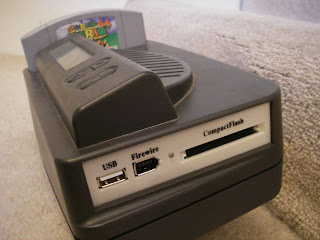
NB, the N64 is a US version with an RGB mod, allowing for best possible video output from a 64. (Obviously).
Bios v 221 (Tested working with CF, Fat16 support only - reports as v2.18, should work.)
Bios v 220(Tested working with CF, Fat16 support only)


This is gloriously wonderful!
ReplyDeleteHi Guy's
DeleteFresh & valid spammed USA SSN+Dob Leads with DL available in bulk.
>>1$ each SSN+DOB
>>2$ each with SSN+DOB+DL
>>5$ each for premium (also included relative info)
Prices are negotiable in bulk order
Serious buyer contact me no time wasters please
Bulk order will be preferable
CONTACT
Telegram > @leadsupplier
ICQ > 752822040
Email > leads.sellers1212@gmail.com
OTHER STUFF YOU CAN GET
SSN+DOB Fullz
CC's with CVV's (vbv & non-vbv)
USA Photo ID'S (Front & back)
All type of tutorials available
(Carding, spamming, hacking, scam page, Cash outs, dumps cash outs)
SMTP Linux Root
DUMPS with pins track 1 and 2
Socks, rdp's, vpn's
Server I.P's
HQ Emails with passwords
Looking for long term business
For trust full vendor, feel free to contact
CONTACT
Telegram > @leadsupplier
ICQ > 752822040
Email > leads.sellers1212@gmail.com
Hi! Thanx a lot for this bios! I did the upgrade with success but after this the lcd says 2.18b again. Is it normal anyway?
ReplyDeletehi,
ReplyDeletemine says 2.18c also. i downloaded another version from techskeen, and that says "2.20 Silverfox." i assume that's the latest version. it works great, thanks to your hard work.
I think both should work fine - just the text is not updated...
ReplyDeleteHowever I've upped the 2.20 version that also works...
HI,
ReplyDeleteWhere to buy the CF device (replacement for zip drive) as i see on your picture ?
Many Thks.
I bought the CF<>IDE adapter with a 3.5" mount off ebay years ago. Generic no-brand.
ReplyDeleteAddonics make very nice adapters that work, but they are much more expensive: http://www.addonics.com/products/flash_memory_reader/AEUDMD4.asp
Nice, great job!
ReplyDeleteGonna try and install it on my Z64 v2 now, and order a IDE to SD card reader. :)
What's the changelog on v221, btw?
yes 221 changes woud be good to know, i'm gonna do this mod in the next couple of days, thanks for the cool bios!
ReplyDeleteNo functional difference between v220 and v221. Think it might report on the LCD as the wrong version - it was an attempt to get FAT32 support working, but I failed to get it working.
ReplyDeleteHi,
ReplyDeleteWhat's that : https://sites.google.com/site/thesilverfoxy/z64bios230.img ?
Thanks
This comment has been removed by the author.
ReplyDeleteThis comment has been removed by the author.
ReplyDeleteThis comment has been removed by the author.
ReplyDeleteThis comment has been removed by the author.
ReplyDeleteThis comment has been removed by the author.
ReplyDeleteSorry for the multiposts.
ReplyDeleteHonestly - can't recall. I had several bios under test, mainly after FAT32 support, but failed.
ReplyDeleteOk, thanks for your reply and excuse me again for the multi-post.
ReplyDeleteYou can found my tut
- here in (bad) english : http://www.assemblergames.com/forums/showthread.php?32088-My-Mister-backup-SD-mod-%29
- here on (great) french : http://x-community.grafbb.com/t1319-n64-tuto-lecteur-sd-sur-mister-backup-z64
Have a good day.
How did you physically attach your drive to the z64? I swapped out my zip drive with the addonics drive a few years ago but never attached it to anything so it hangs loose in the case.
ReplyDeleteI used at least one of the old screw holes in the Z64 - think I made new ones in the addonics. Glue would also work.
ReplyDeletelooks great!
ReplyDeleteIs the USB/FireWire port working too?
Can you plug in a usb stick!?
That would be awesome! I will do this mod on mine soon as my zipdrive has been broken for ages =/
Thanky a lot!
Trying to get my old Z64 up and running... I had swapped the old white Zip Drive for a nice black Zip Drive, but I'm thinking my BIOS chip is fried. Would I be able to flash your modified BIOS to a new chip somehow?
ReplyDeleteYes - there is a socket bios chip inside that can be removed and a new bios flashed with a chip programmer. It's not that common to fry the bios chip though...
ReplyDeleteHrmmm... I'm going to try hooking it up and playing with it this weekend. I'm not sure what else could be wrong with it other than the BIOS chip, should the pass thru work even if not powered on? Thanks for the reply.
DeletePass through on the z64 requires power if I recall correctly. Does anything happen when you power on? lcd light up?
DeleteWhen I powerup my Zip Drive light blinks and my LCD turns on but shows black boxes instead of text. http://i57.tinypic.com/20jfhh2.jpg
DeleteAlso looks like some kind of brownish (scortch marks?) on the middle part of the circuit board? I may have put that riser between the bios chip and the board for easy removal as I was trying to get someone to flash a new bios chip for me at one time. http://i61.tinypic.com/nn2vte.jpg
Hi there? What is the maximum size CF card that is compatible? and when the bios is updated, I'm assuming to do this before swapping out the Zip disk, will the Zip drive still work if I ever want to go back to it without doing a refash?
ReplyDeleteHi. ZIP Drive will still work with the new bios.
ReplyDeleteCF size - not sure, main limit is Fat16 partition sizes - and you only have a few partitions.
More than enough for every N64 rom on a single CF...
Thanks SilverFox for the quick reply. Im reading that FAT16 supports up to 2GB....and would you advise on doing the CF mod or the SD card mod?
ReplyDeleteThanks again...
2GB SD card works perfectly for me, SD cards are cheaper mostly and easier to find these days (but even if you install CF card reader, there are CD to SD adapters).
DeleteI'm now getting a 4GB SD card , it should be possible to format it as FAT16 and hopefully it will work!
https://www.dizzy.co.za/sdhc_fat16.asp
It seems like the Z64 won't read partitions bigger than 2GB for some reason even if they are Fat16, so several partitions is the key, I've formatted my SD card with 2GB FAT16 partitions but for some reason it won't mount the rest of them and I can only access the first one, as far as I can understand it should automount them as folders (DISK-2, DISK-3 etc..), hope I can make it work, if anyone managed to do this I'll be happy to learn how you did it (which tool did you use to format and partition?), thanks!
DeleteGparted on Linux worked perfectly :)
DeleteHeres another question, whats a good game to use as a boot cartridge. I cant seem to get a good price on Mario 64. Any others you recommend, from what Im reading it would need to have EEPROM to save for most of the games.
ReplyDeleteI'm using Pilot Wings 64 instead Mario 64, you can use any other cart with a 4KB EEPROM savechip and a 6102/7101 security chip(cic) like Mario Kart 64, Wave Race, Goldeneye.
DeleteTogether with the bootchip emulation and the country fix you should be able to boot almost every game.
Some games need other boot carts to save (though there are cracks that can still make some of them work with those stated above if you use z64patch.dat v2.7P or 3.0U, like Donkey Kong 64, Jet Force Gemini, Majora's Mask).
More info about boot carts can be found here:
http://web.archive.org/web/20120309021819/http://www.z64faq.tk/what-boot-cartridges-do-i-need
this looks awesome! I have to upgrade my Z64, because the zipdrive is a bit iffy...
ReplyDeletewill it work with this adapter?
https://nl.insight.com/nl/apps/productpresentation/index.php?alert=categoryresults&product_id=0000588132-00000001
and will it work with a 8GB CF flash card, or will it only mount a maximum of 2GB?
jrlsx@hotmail.com
sorry, link seems dead, here's a new one:
ReplyDeletehttps://shop.buyitdirect.com/startech-3-5in-drive-bay-ide-naar-single-cf-ssd-adapterkaart-reader/35baycf2ide/892344
never mind the links...
ReplyDeletei put in the compact flash drive, flashed the bios with your hacked bios, and it works!! another question : Did you hack the z64_2.18c_mod.zip bios? In other words: does it contain the boot emulator?
Silver Fox still around? I'm wondering if anyone has tried an SSD drive with SATA to IDE adapter.
ReplyDeleteHi Guy's
ReplyDeleteFresh & valid spammed USA SSN+Dob Leads with DL available in bulk.
>>1$ each SSN+DOB
>>2$ each with SSN+DOB+DL
>>5$ each for premium (also included relative info)
Prices are negotiable in bulk order
Serious buyer contact me no time wasters please
Bulk order will be preferable
CONTACT
Telegram > @leadsupplier
ICQ > 752822040
Email > leads.sellers1212@gmail.com
OTHER STUFF YOU CAN GET
SSN+DOB Fullz
CC's with CVV's (vbv & non-vbv)
USA Photo ID'S (Front & back)
All type of tutorials available
(Carding, spamming, hacking, scam page, Cash outs, dumps cash outs)
SMTP Linux Root
DUMPS with pins track 1 and 2
Socks, rdp's, vpn's
Server I.P's
HQ Emails with passwords
Looking for long term business
For trust full vendor, feel free to contact
CONTACT
Telegram > @leadsupplier
ICQ > 752822040
Email > leads.sellers1212@gmail.com